React Native App Icon Guide (2026): Generate Android & iOS App Icons Easily
Learn how to generate React Native app icons for Android and iOS. Complete guide covering launcher icons, adaptive icons, app icon sizes, Play Store icons, troubleshooting, best practices, and a free Android App Icon Generator.
React Native App Icon Guide (2026)
A professional app icon is one of the first things users notice before downloading your React Native application. Whether your app appears on the Google Play Store, Apple App Store, Android home screen, or iPhone home screen, a high-quality launcher icon helps create a strong first impression.
Fortunately, React Native developers don't have to manually resize dozens of icon files. Modern tools and packages can automatically generate every required Android and iOS app icon from a single high-resolution image.
In this complete guide you'll learn:
- What React Native app icons are
- Recommended app icon sizes
- Android launcher icons
- iOS app icons
- Adaptive icons
- How to generate app icons automatically
- Best React Native icon packages
- Common mistakes
- Troubleshooting
- Best practices for publishing
If you don't already have a properly sized app icon, create one instantly using our free:
🚀 Quick Answer
React Native app icons are the launcher icons displayed on Android and iOS devices. Instead of manually creating multiple icon sizes, developers can generate every required launcher icon from one high-resolution PNG using tools such as react-native-make or other React Native asset generators.
React Native App Icons at a Glance
| Platform | Supported |
|---|---|
| Android Launcher Icons | ✅ Yes |
| iOS App Icons | ✅ Yes |
| Adaptive Icons | ✅ Yes |
| Google Play Icon | 512 × 512 PNG |
| App Store Icon | 1024 × 1024 PNG |
Table of Contents
- What Are React Native App Icons?
- Why App Icons Matter
- React Native App Icon Sizes
- Android Launcher Icons
- iOS App Icons
- Adaptive Icons
- Generate App Icons
- Best Packages
- Common Errors
- Best Practices
- FAQ
React Native App Icon Workflow
If you're new to React Native app development, the infographic below provides a quick overview of the complete workflow before we explain every step in detail.
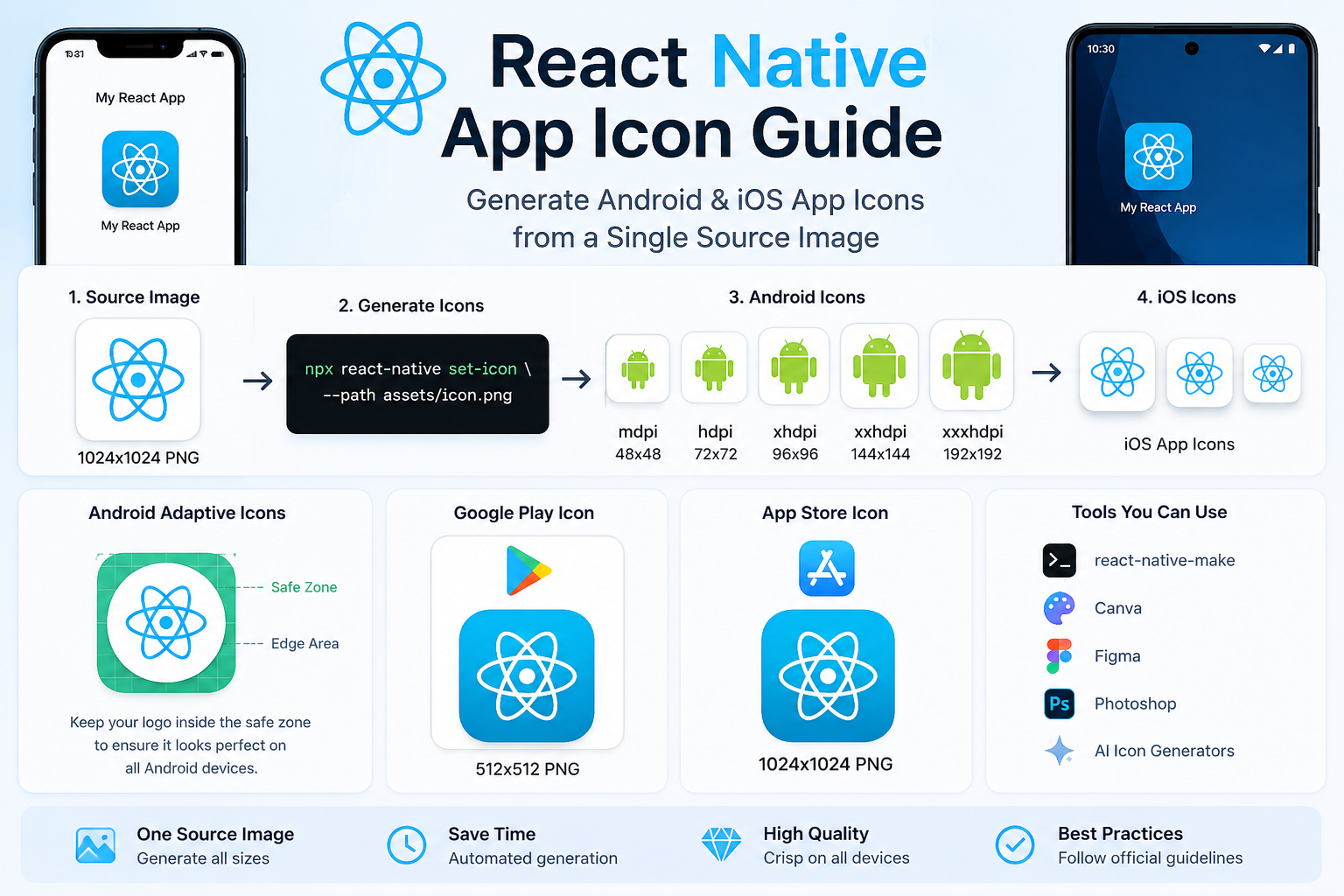
Complete React Native App Icon workflow including Android launcher icons, iOS App Icons, adaptive icons, Play Store icons, App Store icons, generation tools, and publishing best practices.
The following sections explain each step shown in the infographic, including icon generation, configuration, adaptive icons, troubleshooting, and publishing recommendations.
What Are React Native App Icons?
React Native app icons are the images users see when your application is installed on Android or iOS devices.
Unlike a single logo file, mobile applications require multiple icon sizes so they look sharp on devices with different screen resolutions.
React Native follows the native Android and iOS icon requirements, meaning you'll need:
- Android launcher icons
- iOS App Icons
- Google Play Store icon
- Apple App Store icon
- Adaptive icons (Android)
Instead of creating every image manually, developers typically generate all required icons from one master image.
Why App Icons Matter
Your app icon is the visual identity of your application.
Users see it in:
- Google Play Store
- Apple App Store
- Android Home Screen
- iPhone Home Screen
- App Drawer
- Settings
- Search Results
- Recent Apps
A clear, modern icon helps users trust your application before they even install it.
Professional app icons can improve:
- Brand recognition
- User confidence
- Click-through rates
- Store listing appearance
- Overall user experience
React Native App Icon Sizes
React Native uses the same Android launcher icon sizes as native Android applications.
| Density | Size |
|---|---|
| mdpi | 48 × 48 px |
| hdpi | 72 × 72 px |
| xhdpi | 96 × 96 px |
| xxhdpi | 144 × 144 px |
| xxxhdpi | 192 × 192 px |
For Google Play, you'll also need a 512 × 512 PNG app icon.
For iOS App Store submissions, Apple recommends a 1024 × 1024 PNG app icon.
If you're unsure about Android launcher icon sizes, read our Android App Icon Size Guide for a detailed explanation of every required icon dimension.
Need a Proper React Native App Icon?
Start with a high-quality source image.
Our Android App Icon Generator automatically creates:
- Google Play Icon
- Android Launcher Icons
- High-resolution PNG
ready for React Native projects.
👉 Generate Android Icons Free
https://biek.pk/tools/android-app-icon-generator
Best Tools for Generating React Native App Icons
Unlike traditional Android development, React Native developers can automate app icon generation using community tools.
The two most popular approaches are:
- react-native-make
- Manual replacement of Android and iOS assets
For most projects, automated generation saves time and reduces the risk of missing required icon sizes.
Install react-native-make
One of the easiest ways to generate React Native app icons is with react-native-make.
Install it globally using npm:
npm install -g react-native-make
Or use npx:
npx react-native-make
This utility can generate Android launcher icons, iOS app icons, splash screens, and other branding assets from a single source image.
Recommended Source Image
Before generating icons, prepare a high-quality logo.
| Property | Recommendation |
|---|---|
| Size | 1024 × 1024 px |
| Format | PNG |
| Background | Transparent or Solid |
| Shape | Square |
| Resolution | High Quality |
Starting with a large PNG ensures every generated icon remains sharp across Android and iOS devices.
Generate React Native App Icons
After installing the tool, place your icon inside your project.
Example:
assets/icon.png
Run:
npx react-native set-icon --path assets/icon.png
or, depending on the package you use:
react-native set-icon --path assets/icon.png
The package automatically generates all required Android launcher icons and iOS App Icons.
Android Launcher Icons
Android applications require multiple launcher icon sizes for different screen densities.
Generated launcher icons include:
| Density | Size |
|---|---|
| mdpi | 48 × 48 px |
| hdpi | 72 × 72 px |
| xhdpi | 96 × 96 px |
| xxhdpi | 144 × 144 px |
| xxxhdpi | 192 × 192 px |
These files are copied into the correct mipmap folders automatically.
Where Android Icons Are Stored
After generation, Android launcher icons are located inside:
android/app/src/main/res/
You'll find folders including:
mipmap-mdpi
mipmap-hdpi
mipmap-xhdpi
mipmap-xxhdpi
mipmap-xxxhdpi
React Native automatically uses the appropriate launcher icon based on the device's screen density.
Generate iOS App Icons
React Native also supports automatic iOS App Icon generation.
Generated icons are stored in:
ios/<YourProject>/Images.xcassets/AppIcon.appiconset
The package creates every icon size required by Xcode and the Apple App Store.
Google Play Store Icon
Remember that launcher icons are different from your Google Play Store icon.
Google recommends:
| Requirement | Value |
|---|---|
| Size | 512 × 512 px |
| Format | PNG |
| Shape | Square |
Your Play Store icon appears in:
- Search Results
- Recommendations
- Category Pages
- App Listing
A clean, professional Play Store icon improves the overall appearance of your listing.
Apple App Store Icon
Apple requires a larger app icon for App Store submissions.
Recommended size:
1024 × 1024 px
Unlike Android launcher icons, this icon is specifically used for your App Store listing.
Common Installation Errors
Here are a few common problems React Native developers encounter.
Command Not Found
If you see:
command not found
Verify the package is installed correctly:
npm install -g react-native-make
or use:
npx react-native-make
Icon Doesn't Update
Sometimes Android or iOS caches the old launcher icon.
Try:
cd android
./gradlew clean
Then rebuild your project.
Wrong Image Size
Using a small logo often produces blurry launcher icons.
Always begin with:
1024 × 1024 PNG
Missing Assets
Ensure your icon path is correct.
Example:
assets/icon.png
If the image cannot be found, generation will fail.
Pro Tip
Before generating React Native app icons, start with a professionally sized PNG.
Our Android App Icon Generator automatically creates:
- Google Play Icon
- Android Launcher Icons
- High-Resolution PNG
ready for React Native, Flutter, and Android Studio.
👉 https://biek.pk/tools/android-app-icon-generator
React Native Adaptive Icons
Modern Android devices support Adaptive Icons, allowing app icons to appear in different shapes depending on the device manufacturer.
Instead of displaying a fixed square icon, Android automatically applies masks such as:
- Circle
- Rounded Square
- Squircle
- Teardrop
- Custom Shapes
This creates a consistent look across different Android launchers.
How Adaptive Icons Work
Adaptive Icons are made of two separate layers:
- Foreground Layer
- Background Layer
Android combines these layers and displays the icon using the launcher's preferred shape.
To avoid clipping, keep your logo inside the safe area with enough padding around the edges.
Adaptive Icon Best Practices
For the best appearance:
- Keep the logo centered.
- Leave generous padding around the edges.
- Avoid tiny text.
- Use a simple design.
- Test the icon on multiple Android launchers.
Following these recommendations ensures your app icon looks great on every Android device.
React Native App Icon Design Best Practices
A great app icon isn't just about the correct size—it should also represent your application's identity.
Here are some professional design tips.
Use a High-Resolution Source Image
Always begin with:
1024 × 1024 pixels
A high-quality source image produces cleaner launcher icons for Android and iOS.
Use PNG Format
PNG is recommended because it:
- Preserves quality
- Supports transparency
- Produces sharper edges
Avoid JPG whenever possible.
Keep the Design Simple
Simple icons are easier to recognize.
Avoid:
- Complex illustrations
- Tiny text
- Too many colors
- Overcrowded layouts
Users should recognize your app instantly.
Maintain Strong Contrast
High-contrast icons stand out better on:
- Light wallpapers
- Dark wallpapers
- Google Play listings
- App Store search results
Test at Small Sizes
Reduce your icon to approximately:
48 × 48 px
If it's still recognizable, your design is working well.
Designing React Native App Icons in Canva
Canva is an excellent option for beginners.
Recommended workflow:
- Create a new design.
- Set the canvas size to 1024 × 1024 px.
- Keep the logo centered.
- Export as PNG.
- Generate React Native launcher icons.
Designing React Native App Icons in Figma
Figma is widely used by UI and mobile app designers.
Recommended settings:
| Property | Value |
|---|---|
| Frame | 1024 × 1024 px |
| Export | PNG |
| Background | Transparent |
Vector-based designs remain sharp when exported.
Designing React Native App Icons in Photoshop
Adobe Photoshop is another popular choice.
Recommended settings:
| Setting | Value |
|---|---|
| Canvas Size | 1024 × 1024 px |
| Resolution | 72 PPI |
| Format | PNG |
| Color Space | sRGB |
Export your design before generating Android and iOS icons.
Can AI Generate React Native App Icons?
Yes.
AI-powered design tools can create unique app icon concepts.
However, before publishing:
- Ensure the icon remains recognizable at small sizes.
- Avoid excessive details.
- Use a simple composition.
- Keep the logo centered.
- Test adaptive icon cropping.
After creating your artwork, upload it to our Android App Icon Generator to produce React Native-ready launcher icons.
Common React Native App Icon Mistakes
Many developers unknowingly reduce the quality of their app icons.
Avoid these common mistakes.
Using Low-Resolution Images
Never begin with a tiny logo.
Always use a 1024 × 1024 px source image.
Ignoring Adaptive Icons
Adaptive icons improve compatibility across Android launchers.
Skipping them may result in cropped artwork.
Using JPG Instead of PNG
PNG provides much better quality and transparency support.
Adding Too Much Text
Text becomes unreadable on small launcher icons.
Use a memorable symbol or logo instead.
Weak Color Contrast
Low-contrast icons can disappear on certain wallpapers.
Always test your icon on:
- White background
- Black background
- Colorful wallpapers
Forgetting Store Icons
Launcher icons are different from store listing icons.
Remember to prepare:
- Google Play Icon (512 × 512 px)
- Apple App Store Icon (1024 × 1024 px)
Poor Alignment
Off-center logos make an app look unprofessional.
Keep important elements aligned and balanced.
Pro Tip
Before generating React Native launcher icons, create a professionally designed source image.
Our Android App Icon Generator automatically creates:
- Google Play Icon
- Android Launcher Icons
- High-Resolution PNG
ready for:
- React Native
- Flutter
- Android Studio
- Native Android
👉 https://biek.pk/tools/android-app-icon-generator
React Native vs Flutter App Icons
Both React Native and Flutter make it easier to generate application icons compared to native Android development.
Here's a quick comparison.
| Feature | React Native | Flutter |
|---|---|---|
| Android Launcher Icons | ✅ Yes | ✅ Yes |
| iOS App Icons | ✅ Yes | ✅ Yes |
| Adaptive Icons | ✅ Yes | ✅ Yes |
| Automatic Generation | ✅ Yes | ✅ Yes |
| Popular Package | react-native-make | flutter_launcher_icons |
Both frameworks require a high-resolution source image and follow the same Android launcher icon size requirements.
React Native vs Native Android
Native Android projects require developers to manually manage multiple launcher icon folders.
React Native simplifies the process using community packages that generate Android and iOS assets automatically.
| Feature | React Native | Native Android |
|---|---|---|
| Multiple Icon Sizes | Automatic | Manual |
| Android Support | ✅ Yes | ✅ Yes |
| iOS Support | ✅ Yes | ❌ No |
| Adaptive Icons | Supported | Manual Configuration |
| Time Required | Minutes | Much Longer |
React Native App Icon Publishing Checklist
Before publishing your application, make sure you've completed the following checklist.
✅ Source image is 1024 × 1024 px
✅ PNG format
✅ Android launcher icons generated
✅ iOS App Icons generated
✅ Adaptive icons tested
✅ Google Play icon created (512 × 512 px)
✅ Apple App Store icon prepared (1024 × 1024 px)
✅ Logo centered
✅ High contrast
✅ Looks good on dark and light wallpapers
Completing this checklist helps your application look professional across Android and iOS devices.
Frequently Asked Questions
What is a React Native App Icon?
A React Native app icon is the image displayed on Android and iOS devices after an application is installed. It also represents your application in the Google Play Store and Apple App Store.
What image size should I use?
We recommend starting with a 1024 × 1024 PNG.
This allows you to generate every required Android and iOS icon.
Can React Native generate Android launcher icons?
Yes.
Tools such as react-native-make automatically create Android launcher icons for every screen density.
Can React Native generate iOS App Icons?
Yes.
The same tools also generate every AppIcon required by Xcode.
What is the Google Play icon size?
Google recommends:
512 × 512 PNG
for your Play Store listing.
What is the Apple App Store icon size?
Apple recommends:
1024 × 1024 PNG
for App Store submissions.
Should I use PNG or JPG?
PNG is recommended because it provides better image quality and supports transparency.
Can I use SVG?
Most React Native icon generation tools expect a PNG image instead of SVG.
Why is my launcher icon blurry?
This usually happens because:
- The source image is too small.
- JPG was used instead of PNG.
- The logo contains too many small details.
Where are Android launcher icons stored?
Android launcher icons are stored inside:
android/app/src/main/res/
including:
- mipmap-mdpi
- mipmap-hdpi
- mipmap-xhdpi
- mipmap-xxhdpi
- mipmap-xxxhdpi
Where are iOS icons stored?
Inside:
ios/<ProjectName>/Images.xcassets/AppIcon.appiconset
Can AI generate React Native app icons?
Yes.
AI tools can generate icon concepts, but always review them manually before publishing.
Do app icons improve downloads?
A professional app icon improves your application's first impression and can increase click-through rates from app store search results.
Are launcher icons and Play Store icons the same?
No.
Launcher icons are used on Android and iOS devices, while the Play Store icon is a separate 512 × 512 PNG used only for your Google Play listing.
Related Resources
If you're building Android or React Native applications, these guides may also help:
- Android App Icon Size Guide
- Flutter Launcher Icons Guide
- Google Play Feature Graphic Size Guide
- Android Adaptive Icon Guide
You can also use these free tools on biek.pk:
- Android App Icon Generator
- Google Play Feature Graphic Generator
- Compress Image to 20KB
- Image Background Color Changer
About This Guide
This guide is regularly updated to reflect the latest React Native, Android, and Google Play publishing recommendations.
Last Updated: July 2026
Our content is based on official platform guidelines and real-world mobile app development practices to help developers generate professional app icons quickly and correctly.
Generate React Native App Icons in Seconds
Need a properly sized app icon?
Our Android App Icon Generator automatically creates:
✅ Google Play Icon (512 × 512)
✅ Android Launcher Icons
✅ High-Resolution PNG
Perfect for:
- React Native
- Flutter
- Android Studio
- Native Android
Simply upload your logo and download ready-to-use Android assets in seconds.
👉 Generate Android App Icons Free
https://biek.pk/tools/android-app-icon-generator
Final Thoughts
A professional app icon is one of the easiest ways to improve the visual quality of your React Native application.
Instead of manually resizing images for Android and iOS, use modern tools to generate every required icon from a single high-resolution PNG.
Whether you're publishing your first React Native app or maintaining an existing project, following the best practices in this guide will help ensure your application looks polished across devices and app stores.
For the fastest workflow, start with a high-quality logo and use our free Android App Icon Generator to generate Play Store-ready and launcher-ready icons in just a few clicks.